
Google Analytics 4 (GA4) BigQuery exports include a wide range of traffic source attribution fields. This variety can feel overwhelming when you’re first trying to understand and calculate attribution. You might envision it in a specific way. In this guide, I’ve outlined the key concepts and steps I’ve gathered so far in navigating GA4 attribution. I hope these insights will support analysts and marketers in making more informed decisions. They can also help in building a clearer attribution framework.
First-Click Attribution (User Scoped)
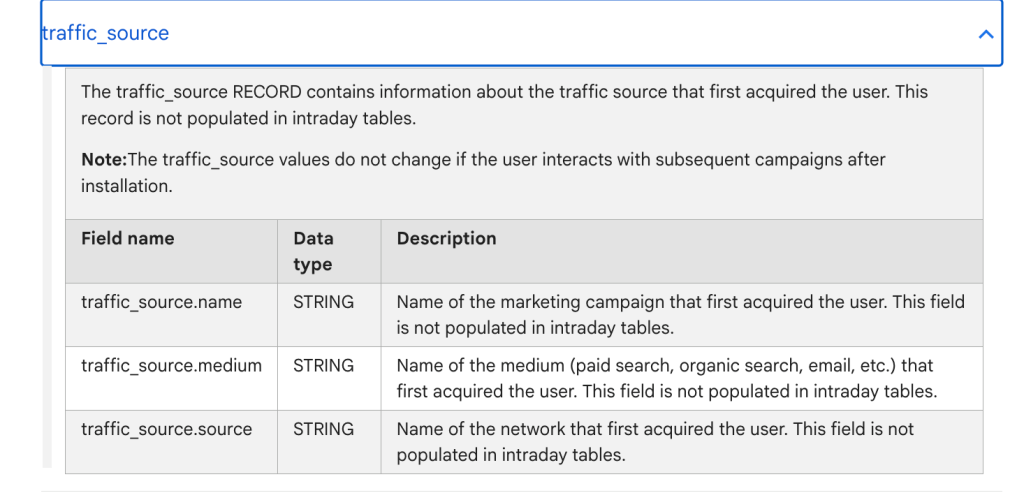
The traffic_source record in GA4 BigQuery captures the first-touch attribution—i.e., the campaign, medium, and source that initially brought the user in. This data does not update with later user interactions and is not available in intraday tables.
traffic_source.name: Initial campaign nametraffic_source.medium: Initial traffic medium (e.g., email, organic)traffic_source.source: Initial traffic source (e.g., Google, Facebook)
This is useful for understanding user acquisition origin, not ongoing session behavior.
Last-Click Attribution (Session Scoped)
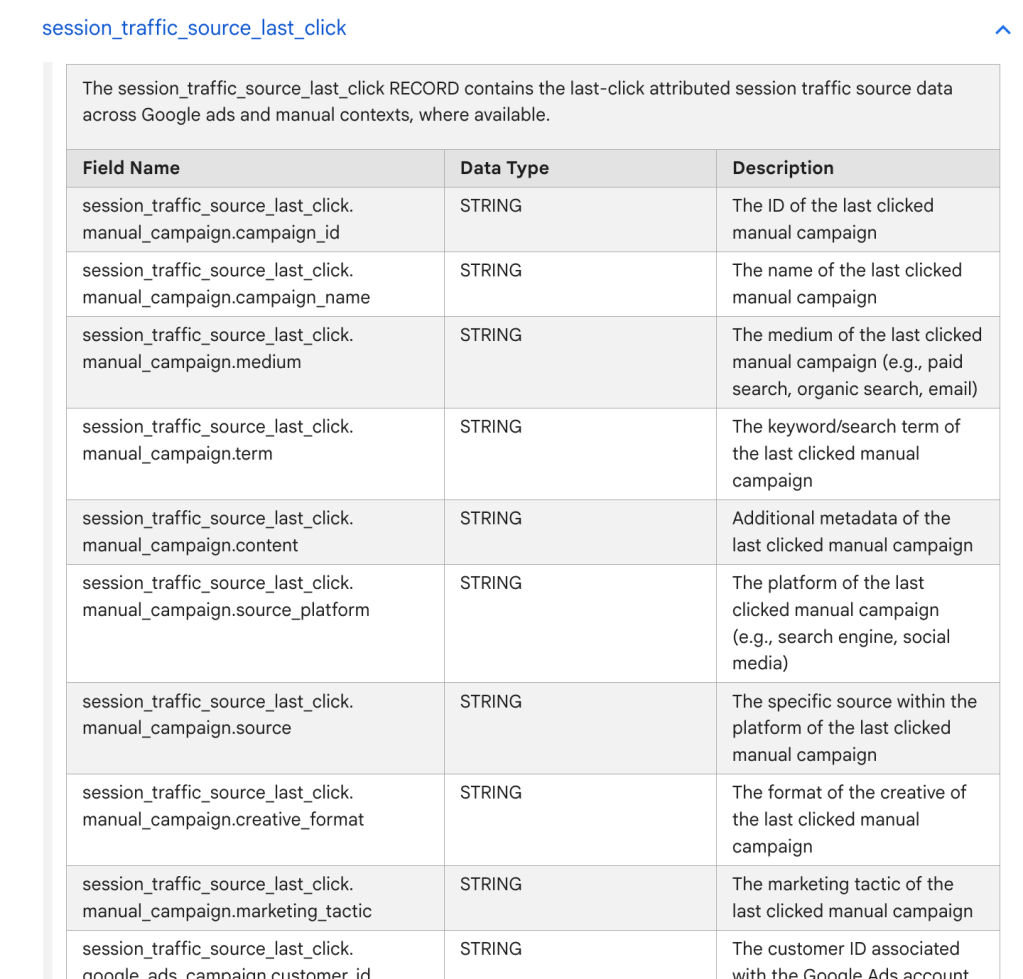
The session_traffic_source_last_click record in GA4 BigQuery captures the last-click attributed traffic source for a session. This includes detailed campaign data from manual campaigns and various Google marketing platforms (e.g., Google Ads, SA360, DV360, CM360).
🔹 Manual Campaigns (UTM-based):
Includes fields such as campaign ID/name, medium, source, term, content, platform, creative format, and marketing tactic — based on the last clicked campaign before the session started.
🔹 Google Ads Campaigns:
Tracks Google Ads-specific details like customer ID, account name, campaign and ad group IDs/names.
🔹 Cross-Channel Campaigns:
Captures last-click campaign data across multiple platforms including campaign name/ID, medium, source, and source platform.
🔹 SA360 (Search Ads 360):
Provides campaign, ad group, creative, and engine-level details — including manager and engine account names and types.
🔹 DV360 (Display & Video 360):
Extensive metadata including advertiser, campaign, creative, exchange, insertion order, line item, partner, source, and medium.
🔹 CM360 (Campaign Manager 360):
Includes campaign, creative, placement, site details, and creative attributes like type, version, and cost structure.
This record is essential for performing session-level last-click attribution analysis across both manual and paid campaign contexts. It enables marketers and analysts to understand what campaign interaction immediately preceded a user session. This supports accurate performance tracking and optimization.
Last-Click Attribution (Event-Scoped)
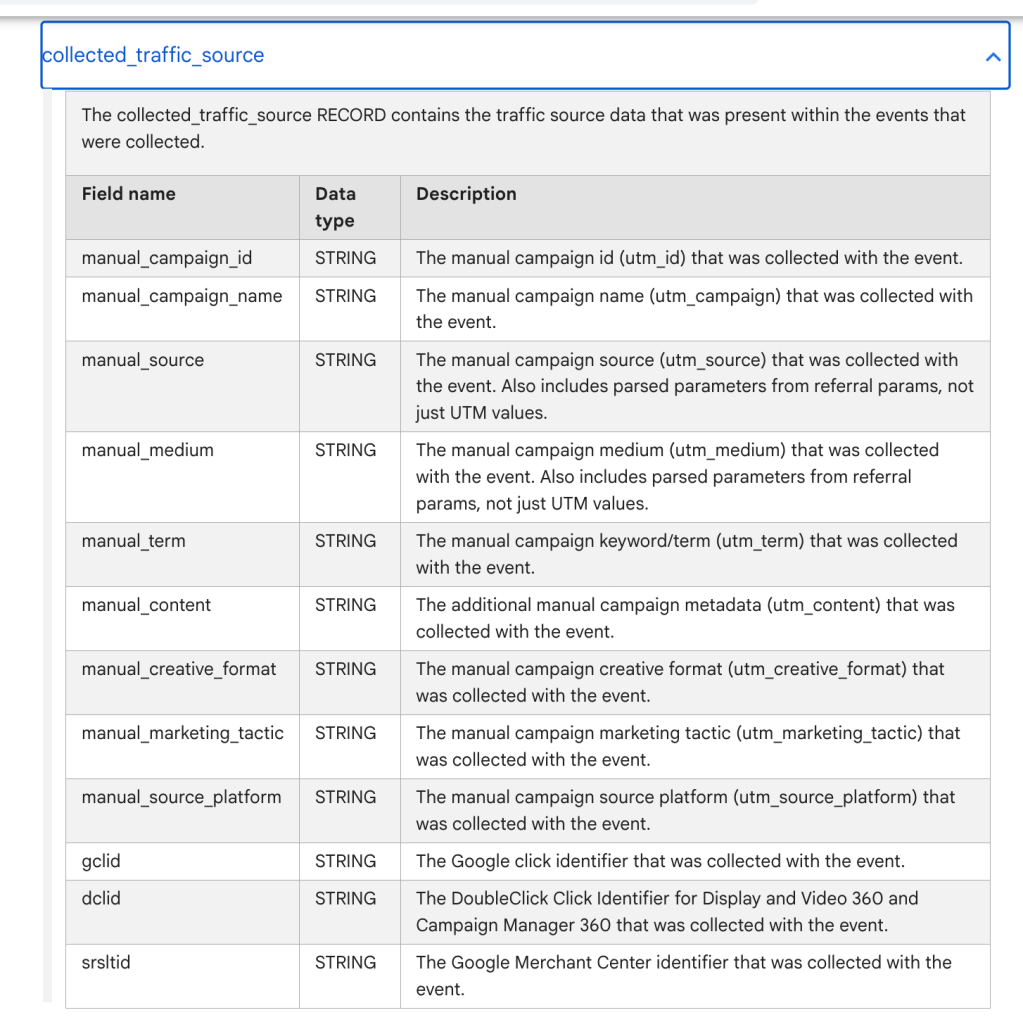
The collected_traffic_source record in GA4 BigQuery exports contains traffic source data collected with each event. It includes both manual UTM parameters and automatic identifiers:
- Auto Tracking IDs:
gclid(Google Ads),dclid(Display & Video 360 / Campaign Manager),srsltid(Google Merchant Center).
- Manual UTM Parameters:
utm_id,utm_campaign,utm_source,utm_medium,utm_term,utm_content,utm_creative_format,utm_marketing_tactic,utm_source_platform.
https://support.google.com/analytics/answer/7029846?sjid=2838849962983543989-NA
Choosing the Right Fields for Channel Grouping
Most accurate field: session_traffic_source_last_click.cross_channel_campaign (available after Oct 9, 2024) is closest to what the GA4 UI shows, including values like direct and (not set).
Attribution Model in GA4
- GA4 uses a last non-direct click attribution model:
- Assigns 100% credit to the last non-direct source before conversion.
- Direct traffic is ignored unless it’s the only source in the path.
- Example: If the final conversion is preceded by Paid Search, Organic, and Direct, credit goes to Paid Search (the last non-direct touchpoint).
Lookback Window
- Default is 30 days, adjustable to 60 or 90 days.
- Impacts how far back an interaction is considered for attribution.
- Ensure your BQ queries align with the configured lookback window in GA4 Admin settings.
Reporting Identity & Session Calculation
- GA4 allows different reporting identity settings: Device-based, Blended, or Observed.
- Session ID generation in BQ should reflect the selected identity:
- Blended:
concat(coalesce(user_id, user_pseudo_id), ga_session_id) - Device-based:
concat(user_pseudo_id, ga_session_id)
- Blended:
- Consent Mode can affect attribution in the UI due to AI-driven adjustments not visible in BQ.
Known Issues
- Incorrect source/medium when
gclid/dclidis present. Bug causes mis-attribution, especially for Google Ads traffic. gclidis not present on iOS due to Apple’s AppTrackingTransparency (ATT)- Attribution can take 1–2 days to stabilize due to data delay
- GA4 in BQ groups null, (not set), and direct under “direct”, leading to overcounting.


Leave a comment