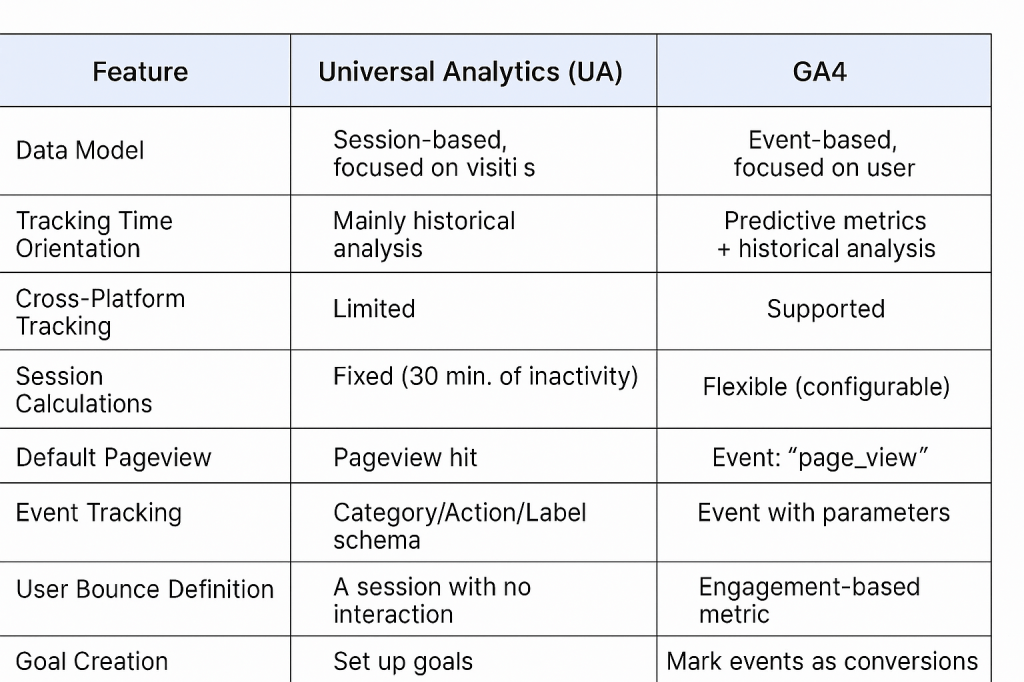
One of the most powerful features in web analytics is exporting raw data into BigQuery for deep analysis. Both Universal Analytics (UA) and Google Analytics 4 (GA4) support BigQuery, but they do it in very different ways.
If you’re a data analyst, engineer, or marketer working with BigQuery, understanding how GA4 and UA differ can save you hours of confusion — and open up new opportunities for advanced analytics.
Availability: Free vs Paid
| Feature | GA4 | Universal Analytics (UA) |
|---|---|---|
| BigQuery Export | ✅ Free for all GA4 properties | ❌ Only available with GA360 (paid version) |
With GA4, BigQuery export is included for free, even for standard properties — a huge win for small teams and startups.
In contrast, Universal Analytics only offered BigQuery export with GA360, which cost ~$150,000/year, making it inaccessible for most users.
Data Structure & Schema
Universal Analytics BigQuery Schema is session-based:
- Tables are exported by date.
- Each row represents one session.
- All hits (pageviews, events, etc.) are nested inside that session.
GA4 BigQuery Schema is event-based:
- Each row is one event.
- There is no session container — everything is flat and time-stamped.
- You must reconstruct sessions manually if needed (e.g., grouping by
ga_session_id).
✅ Pros of GA4 Schema: Easier for streaming, more flexible for analysis
❗Cons: Requires more effort to recreate session-level reporting
Export Frequency & Latency
| Feature | GA4 | UA (GA360) |
|---|---|---|
| Export Frequency | Daily (standard) or Streaming (paid) | Daily |
| Export Latency | ~24 hours (daily), real-time (streaming) | ~24 hours |
GA4 allows daily export by default, and streaming export if you’re using GA4 360.
UA GA360 offered only daily exports, and you needed to wait ~24 hours for your data to land.
Session & Traffic Source Attribution
In Universal Analytics, sessions and traffic sources were clearly available in the export as structured fields.
In GA4, it’s trickier:
- You need to use the
session_startevent and relatedtraffic_sourcefields. - Attribution fields like
source,medium, andcampaignmay differ based on the model used. - There’s often confusion around first-touch vs last-touch, especially when comparing with GA4’s UI.
📌 Tip: Use session_start + traffic_source.name/medium/source in user_properties or event_params to align attribution.
Custom Dimensions & Parameters
- In UA, custom dimensions were stored in nested arrays within sessions or hits.
- In GA4, custom parameters are stored in
event_paramsanduser_propertiesarrays.
GA4 is much more flexible, allowing arbitrary key-value pairs — but:
- You need to unpack them manually using SQL (e.g.,
UNNEST()+WHERE key = 'x'). - This can make queries more complex, especially for newcomers.
Data Volume & Cost Considerations
GA4 exports more granular data (event-level), which means:
- More rows
- Higher query costs
- But also more powerful analysis possibilities
📉 In UA, fewer rows were exported (1 row per session), so costs were typically lower.
💡 Tip: Use partitioning (_TABLE_SUFFIX), clustering, and preview mode to reduce BigQuery costs when working with GA4 exports.
SQL Querying: What’s Different?
Here’s a basic comparison:
✅ GA4 queries are more powerful, but also require deeper SQL skills.
UA-style query:

SELECT
  fullVisitorId,
  visitId,
  hits.page.pagePath
FROM
  `project.dataset.ga_sessions_*`
WHERE
  _TABLE_SUFFIX BETWEEN '20220101' AND '20220131'

GA4-style query:

SELECT
  user_pseudo_id,
  event_name,
  event_timestamp,
  ep.value.string_value AS page_path
FROM
  `project.dataset.events_*`,
  UNNEST(event_params) AS ep
WHERE
  ep.key = 'page_location'
  AND _TABLE_SUFFIX BETWEEN '20230101' AND '20230131'
Final Thoughts
GA4 and BigQuery are a match made for modern analytics. While it has a steeper learning curve than Universal Analytics, the benefits are well worth it. You get free access to granular event data. Additionally, it offers cross-platform tracking.
If you’re just starting out:
- Learn how to reconstruct sessions in GA4
- Use Explorations for UI-level analysis, and BigQuery for deep dives
- Monitor query costs and optimize with best practices
BigQuery in GA4 is not just a tool — it’s your gateway to data science, machine learning, and advanced segmentation.

Leave a comment